Recreate Any Reference Video with AI: Ultra-Realistic 10-Second Cinematic Video Prompt
Artificial Intelligence has made video creation easier than ever. Today, you can use advanced AI video generation tools to recreate realistic videos from reference footage while maintaining character appearance, clothing, background, movements and cinematic details.
If you want to recreate a reference video as accurately as possible, having a detailed prompt is extremely important.
In this guide, you will get a professional 10-second ultra-realistic AI video generation prompt designed to recreate an existing reference video with consistent character identity, natural wind movement, realistic fabric physics and accurate scene composition.
This prompt is suitable for experimenting with AI video generation platforms such as Google Flow, Veo and other image-to-video or reference-video workflows that support the required inputs.
Table of Contents
Reference Video
What Does Reference Video Recreation Mean?
Reference video recreation is an AI video generation technique where an existing video is used as the primary visual reference for creating a new video.
Instead of generating an entirely different scene, the goal is to preserve the important visual elements of the original footage, including:
- Character appearance and facial identity.
- Original clothing and outfit colors.
- Body posture and hand positions.
- Background and environment.
- Camera angle and composition.
- Wind direction and fabric movement.
- Facial expressions and natural gestures.
- Original timing and motion.
The more clearly these elements are described, the easier it is to guide an AI video generation model toward the intended result.t Does Reference Video Recreation Mean?
What Will This AI Video Prompt Create?
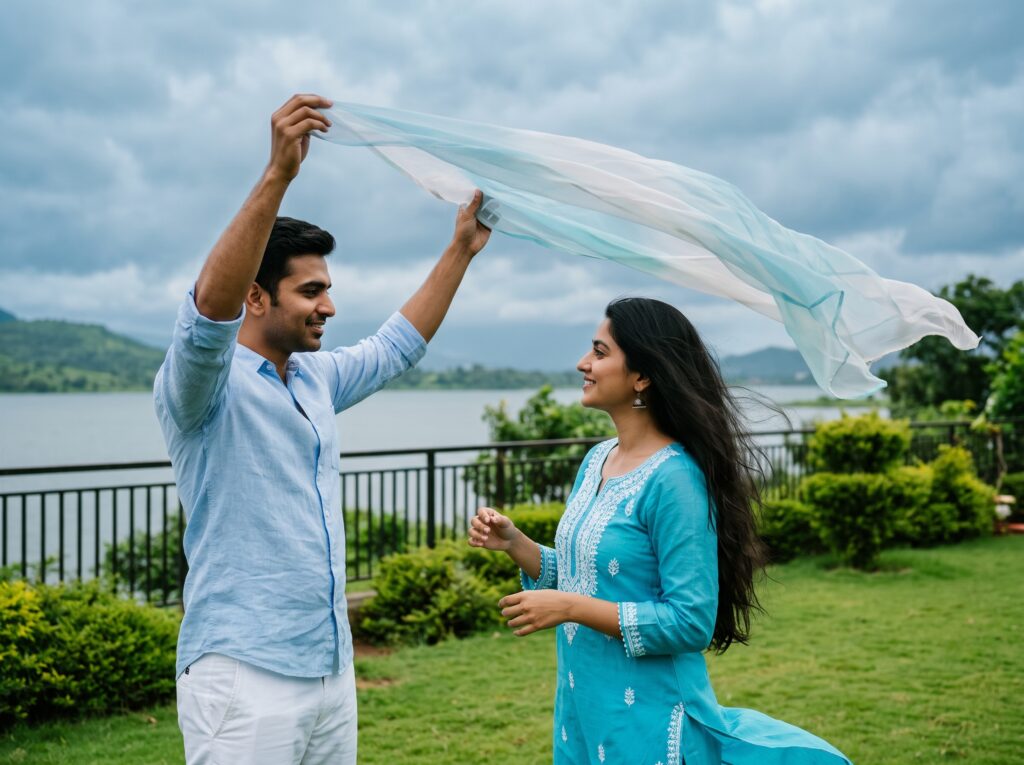
This prompt is designed around a romantic lakeside garden scene featuring two characters.
Male Character:
- Standing on the left side of the frame.
- Wearing a light-blue shirt and white trousers.
- Holding a lightweight translucent dupatta above the woman’s head.
- Maintaining a natural standing posture.
Female Character:
- Standing on the right side of the frame.
- Wearing a bright turquoise-blue salwar suit with white embroidery.
- Long dark hair and matching earrings.
- Maintaining a gentle smile and natural expression.
Background Environment:
- Beautiful green lawn.
- Neatly trimmed bushes.
- Metal railing.
- Lakeside water and distant green landscape.
- Cloudy blue-grey sky.
- Natural daylight.
The main objective is to recreate the original scene without introducing unnecessary creative changes.
Copy-Paste: Ultra-Realistic AI Video Recreation Prompt
Below is the complete prompt. Copy it and use it with your supported AI video generation workflow.
Main AI Video Prompt
Enter your text here…Create a 10-second ultra-realistic cinematic video in vertical 9:16 aspect ratio, recreating the uploaded reference video as accurately as possible. STRICT REFERENCE MATCHING — HIGHEST PRIORITY The original reference video is the primary source for every visual detail. Reproduce the same colors, same movement, same motion, same wind direction, same airflow, same facial expressions, same poses, same timing and same scene composition. CHARACTERS AND OUTFITS MALE CHARACTER: Positioned on the left side of the frame, wearing the exact same light-blue shirt and white trousers as in the reference. Preserve his original hairstyle, appearance, body proportions and posture. FEMALE CHARACTER: Positioned on the right side, wearing the exact same bright turquoise-blue salwar suit with white embroidery and matching styling. Preserve her original hairstyle, long dark hair, earrings, facial appearance and body proportions. If separate character identity images are supplied, use them exclusively for facial identity. Do not change the original outfits or actions. LOCATION AND BACKGROUND Reproduce the exact lakeside garden environment: * Green lawn and neatly trimmed bushes. * Metal railing behind the characters. * Water body and distant green landscape. * Cloudy blue-grey sky. * Same background depth, object placement and perspective. * Same natural daylight and original color grading. SHOT-BY-SHOT ACTION 00:00–00:02 The man stands on the left and holds the sheer, translucent pale-blue and white dupatta above the woman’s head. The fabric partially covers her initially, then naturally reveals her face as it moves with the wind. 00:02–00:04 The woman stands in the same position, gently looking toward the man with the exact soft smile and relaxed facial expression seen in the reference. Her hands remain naturally positioned near her chest and waist. 00:04–00:06 The wind continuously moves the translucent dupatta toward the right side. Her long hair flows naturally in the same direction. Her turquoise-blue outfit moves gently with the airflow. 00:06–00:08 The man maintains his raised-arm position and gently adjusts the flowing fabric, following the same hand movement as the reference. The woman looks toward him with the same gentle expression. 00:08–00:10 Continue the original movement naturally. Maintain the same body positions, facial expressions, hand placement and fabric movement. Finish with the same visual composition as the final reference frames. WIND AND FABRIC PHYSICS This is extremely important: Reproduce the same airflow throughout the entire video. The dupatta must remain lightweight, translucent and continuously fluttering with natural fabric physics. Its edges ripple and wave in the same direction and with similar intensity as the reference. The woman’s long hair and loose clothing should react to exactly the same wind direction and intensity. Do not create stronger wind, random gusts or a different fabric trajectory. CAMERA AND VISUAL QUALITY Maintain the original vertical framing, camera position, subject placement and perspective. No unnecessary zooming, orbiting, camera rotation, dramatic push-ins or scene changes. Natural movement at normal speed, realistic facial details, accurate hands and fingers, clear HD image quality, natural daylight and faithful original color grading. STRICT NEGATIVE CONSTRAINTS No outfit changes. No color changes. No background replacement. No altered wind direction. No different airflow. No changed facial expressions. No exaggerated smiling. No additional gestures. No unnecessary body movement. No hairstyle changes. No face swapping or identity drift. No artificial slow motion. No extra characters or objects. No text, subtitles, logos or watermarks. FINAL REQUIREMENT: The generated video must look like the same original footage recreated with consistent character identity. Prioritize exact visual and motion matching over adding new cinematic creativity.
How to Use This Prompt Step by Step
Follow these steps to get the best possible results.
Step 1: Select Your AI Video Generator
Choose an AI video generation platform that supports reference images, video references or image-to-video generation.
Examples include:
- Google Flow / Veo.
- Other AI video generators with reference-based workflows.
Step 2: Upload Your Reference Video
Upload the original video that you want to recreate, if your selected platform supports video references.
The reference footage is important because the AI needs visual information about the original scene, characters and movements.
Step 3: Upload Character Reference Images (Optional)
If your platform supports separate character reference images, upload them to help maintain facial identity.
Remember that character reference images and scene references serve different purposes. Use the original scene reference to guide clothing, poses and composition.
Step 4: Copy and Paste the Prompt
Copy the complete prompt provided above and paste it into the AI video generator.
Step 5: Choose Video Settings
Recommended settings:
| Setting | Value |
|---|---|
| Duration | 10 seconds |
| Aspect Ratio | 9:16 |
| Style | Ultra-realistic |
| Camera | Fixed / Original perspective |
| Motion | Natural |
| Lighting | Natural daylight |
| Quality | Highest available |
| Audio | Not required |
Step 6: Generate and Review
Generate your video and compare it with the original reference footage.
Pay particular attention to facial identity, fabric movement, wind direction, hand positions and background consistency.
Important Tips for Better AI Video Results
1. Use a High-Quality Reference
A clear reference video helps the AI understand the original characters, clothing, environment and movement.
2. Focus on Character Consistency
Facial identity can change during AI video generation. Use supported character-reference features whenever available.
3. Describe Wind and Fabric Movement
Lightweight fabrics such as dupattas, scarves and dresses can be difficult for AI models to reproduce accurately.
Clearly describe the direction, intensity and continuous movement of the wind.
4. Avoid Unnecessary Camera Movements
If the original footage has a fixed camera, explicitly instruct the AI not to introduce zooming, camera rotation or dramatic movements.
5. Generate Multiple Versions
AI video generation is not always perfectly predictable. Try multiple generations and select the version that most closely matches your reference.
Frequently Asked Questions (FAQs)
Q1. Can I recreate an existing video using AI?
Yes. Some AI video platforms support video references or image-to-video workflows. The results depend on the platform’s available features and reference-input limitations.
Q2. Can AI maintain the same face in a recreated video?
AI can often preserve facial identity with the help of character reference features, but perfect identity consistency is not guaranteed.
Q3. Why does AI sometimes change clothing or background details?
AI models may interpret prompts creatively. Strong reference instructions, clear source material and supported reference controls can help reduce unwanted changes.
Q4. Can I use this prompt with Google Flow or Veo?
You can adapt this prompt for Google Flow and Veo workflows. However, available reference-video inputs and generation settings may vary by model and platform.
Q5. Is this prompt suitable for vertical Instagram Reels and YouTube Shorts?
Yes. The prompt specifies a 9:16 vertical aspect ratio, which is suitable for vertical short-form video formats.
Q6. Does this prompt guarantee an exact recreation?
No. AI-generated videos can differ from the original because of model limitations, randomness and reference-input capabilities. This prompt is designed to improve visual and motion consistency, not guarantee a frame-perfect reproduction.
Final Thoughts
Creating realistic AI videos requires more than a simple description. You need detailed instructions about character identity, clothing, background, camera position, movement, lighting and environmental physics.
This 10-second reference video recreation prompt provides a structured starting point for creating realistic cinematic videos while keeping the original scene as consistent as possible.
Experiment with different supported AI video tools, use high-quality reference material and refine your prompts to achieve better results.
If you found this prompt useful, bookmark this page and share it with other AI video creators.
-
Recreate Any Reference Video with AI: Ultra-Realistic 10-Second Video Prompt
Recreate Any Reference Video with AI: Ultra-Realistic 10-Second Cinematic Video Prompt Artificial Intelligence has made video creation easier than ever. Today, you can use advanced AI video generation tools to recreate realistic videos from reference footage while maintaining character appearance, clothing, background, movements and cinematic details. If you want to recreate a reference video as…